
Moosend Review 2026: Features, Pricing & Results
I tested Moosend for 30 days to see if it really delivers on its promise of affordable email marketing with powerful automation.
In this Moosend review 2026, you’ll discover its features, pricing, deliverability, and real performance results plus whether it’s actually worth your money or just another budget tool.
If you’re looking for an email marketing platform that balances cost, automation, and simplicity, this guide will help you decide quickly.
Moosend Review 2026 (Quick Verdict)
- ⭐ Rating: 8.7/10
- Best for: Small businesses & beginners
- Pricing: Starts at $9/month
- Free Trial: Yes
- Biggest Strength: Automation + affordability
- Biggest Weakness: Limited integrations
Moosend Review Overview
Moosend is an affordable email marketing platform built for small to medium-sized businesses that want powerful automation without high costs. It combines email campaigns, marketing automation, landing pages, and basic CRM tools in one simple dashboard.
Founded in 2011 and later acquired by Sitecore, Moosend has positioned itself as a budget-friendly alternative to tools like Mailchimp and ActiveCampaign.
The platform focuses on three main things:
- Easy campaign creation
- Powerful automation workflows
- Affordable pricing based on subscribers
Moosend is especially popular among beginners, bloggers, ecommerce stores, and small businesses that need automation but don’t want complicated software.
In this Moosend Review, we look at features, pricing, performance, and real-world usability to help you decide if it’s the right email marketing tool for your business in 2026.
Features and Automation Capabilities
In this Moosend Review, features and automation are the main reasons many businesses consider this platform. Moosend focuses heavily on marketing automation while keeping the system simple to use.
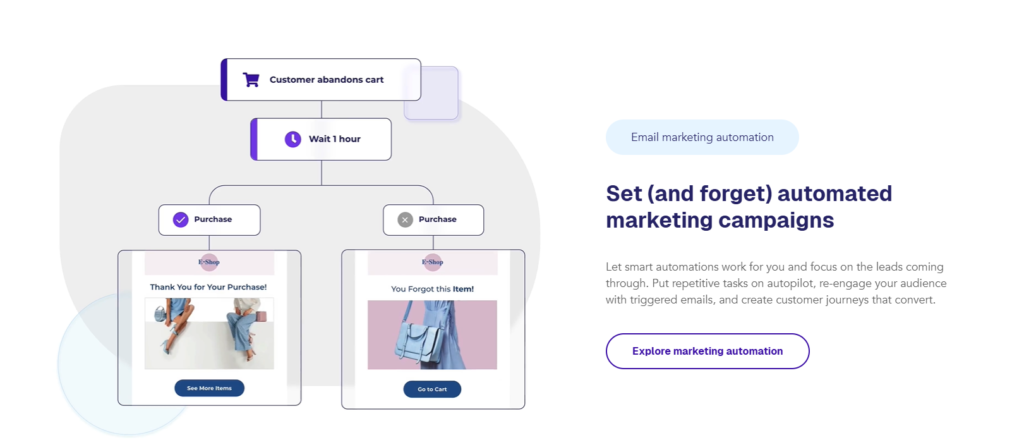
Moosend allows you to create automated workflows using a visual drag-and-drop builder. You can design customer journeys without coding or technical skills.
You can trigger automations based on:
- Email opens and clicks
- Website visits
- Product purchases
- Cart abandonment
- Custom subscriber behavior
This makes it useful for lead nurturing and ecommerce marketing.
Moosend also includes advanced segmentation. You can group subscribers based on behavior, location, engagement, and purchase history. This helps you send more targeted and personalized emails.
Another strong feature is pre-built automation templates. These include welcome sequences, abandoned cart recovery, re-engagement campaigns, and upsell flows. Beginners can launch faster without building everything from scratch.
The platform supports personalization using custom fields. You can add names, product details, and dynamic content inside emails to increase engagement.
For reporting, Moosend provides real-time analytics. You can track open rates, click-through rates, conversions, and revenue performance.
Overall, in this Moosend Review, the automation capabilities stand out as one of the biggest advantages especially for businesses that want powerful workflows at a lower price point.
Email Campaign Builder and Templates
In this Moosend Review, the email campaign builder is one of the easiest parts of the platform to use. It is designed for beginners but still powerful enough for advanced users.
Moosend offers a drag-and-drop editor. You can build emails by simply adding content blocks like text, images, buttons, spacers, and social icons. No coding is required.
The interface is clean and not overwhelming. You can quickly adjust colors, fonts, and layouts to match your brand.
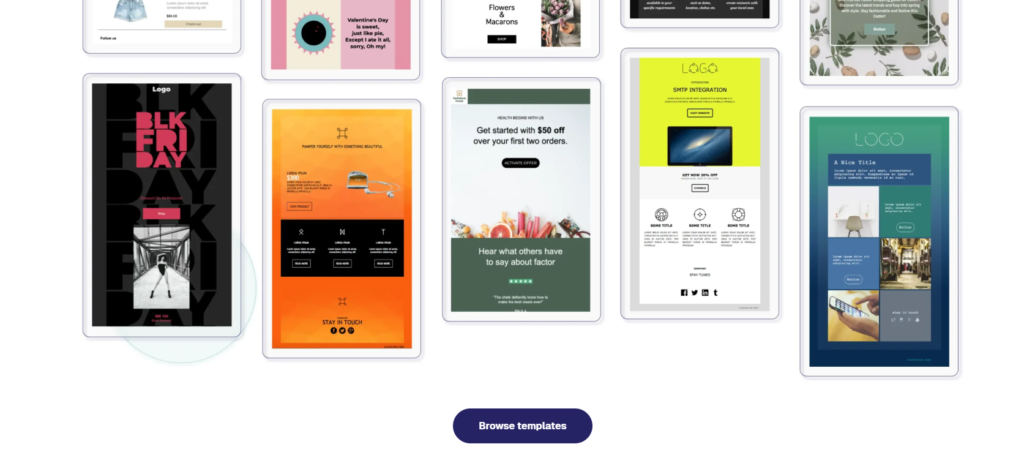
Moosend also provides a large library of ready-made templates. These templates are organized by purpose, such as:
- Newsletters
- Promotions
- Product launches
- Seasonal campaigns
- Ecommerce offers
This saves time, especially if you don’t want to design emails from scratch.
Personalization is built into the editor. You can insert subscriber names, custom fields, and dynamic product recommendations. This helps improve engagement and click rates.
Another helpful feature is mobile preview. You can see how your email looks on desktop and mobile before sending. This is important because most users open emails on their phones.
You can also save your own templates. This is useful if you want a consistent brand design across all campaigns.
Overall, in this Moosend Review, the campaign builder stands out for being simple, fast, and beginner-friendly while still offering enough flexibility for serious email marketers.
Pricing Plans and Value for Money
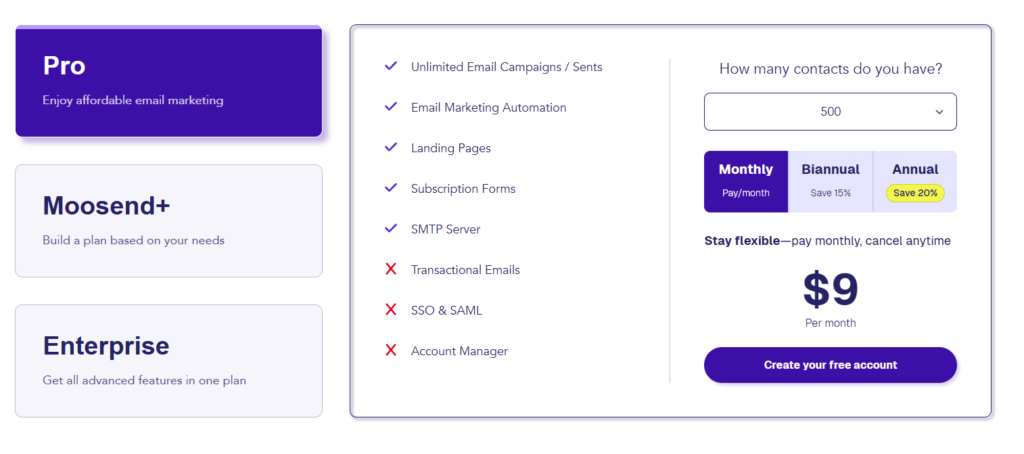
In this Moosend Review, pricing is one of the strongest reasons many small businesses choose this platform. Moosend keeps its structure simple and transparent. You pay based on the number of subscribers, and all Pro features are included.
Here is a breakdown of the current Pro plan pricing:
500 Subscribers – $9/month
Unlimited emails with full Pro features.
1,000 Subscribers – $16/month
Unlimited emails with full Pro features.
2,000 Subscribers – $24/month
Unlimited emails with full Pro features.
3,000 Subscribers – $32/month
Unlimited emails with full Pro features.
5,000 Subscribers – $48/month
Unlimited emails with full Pro features.
10,000 Subscribers – $88/month
Unlimited emails with full Pro features.
25,000 Subscribers – $160/month
Unlimited emails with full Pro features.
All plans include automation workflows, landing pages, segmentation, reporting, and email campaigns. There are no hidden feature upgrades between lower tiers.
For growing businesses, this pricing model makes budgeting predictable. You can scale your subscriber list without losing access to important tools.
Overall, in this Moosend Review, the platform offers strong value for money. It combines affordable pricing with advanced automation features, making it a practical option for startups and small to medium-sized businesses.
Compared to tools like Mailchimp and ActiveCampaign, Moosend offers more affordable pricing but fewer advanced integrations.
Deliverability and Performance Results
In this Moosend Review, deliverability is a key factor for anyone serious about email marketing. It does not matter how good your campaigns look if they do not reach the inbox.
Moosend uses dedicated infrastructure and monitoring systems to maintain strong email deliverability rates. The platform supports authentication protocols like SPF and DKIM, which help improve inbox placement and protect sender reputation.
Another important factor is list management. Moosend automatically handles bounces and unsubscribes. This helps keep your email list clean and reduces the risk of spam issues.
Performance tracking is built into the dashboard. You can monitor:
- Open rates
- Click-through rates
- Bounce rates
- Unsubscribes
- Conversions
Reports update in real time. This allows you to quickly adjust subject lines, content, or targeting if performance drops.
Moosend also supports A/B testing. You can test subject lines or content variations to improve engagement and increase overall campaign results.
For ecommerce businesses, revenue tracking helps measure how much sales each campaign generates. This makes it easier to calculate return on investment.
Overall, in this Moosend Review, deliverability and reporting tools provide solid performance insights. While results always depend on your list quality and strategy, the platform offers the essential tools needed to maintain healthy inbox placement and optimize campaigns.
Ease of Use and User Experience
In this Moosend Review, ease of use is one of the platform’s strongest advantages. The interface is clean, simple, and beginner-friendly.
The dashboard is well organized. Main sections like campaigns, automations, lists, and reports are easy to find. You do not need technical skills to start.
Setting up your first email campaign is straightforward. The step-by-step process guides you from choosing a template to sending or scheduling your email.
The automation builder uses a visual workflow editor. You can create sequences by dragging and connecting actions. This makes complex funnels easier to understand.
Navigation is smooth and fast. Pages load quickly, and most features are clearly labeled. This reduces confusion, especially for new users.
Moosend also provides helpful tooltips and documentation inside the platform. Beginners can learn without feeling overwhelmed.
For growing teams, user management options allow controlled access to different parts of the account.
Overall, in this Moosend Review, the user experience is simple but powerful. It balances advanced automation features with an interface that remains easy to use for small businesses and beginners.
Who Should Use Moosend
- Small businesses looking for affordable email marketing
- Bloggers and content creators
- Ecommerce stores needing automation workflows
- Beginners who want an easy-to-use platform
Who Should Avoid Moosend
- Large enterprises needing advanced CRM systems
- Businesses requiring deep integrations
- Advanced marketers looking for highly complex automation
Pros and Cons
Here’s a quick breakdown of Moosend pros and cons to help you decide faster:
Pros✅
Affordable pricing
Moosend offers competitive pricing, especially for small and growing businesses.
Unlimited emails on paid plans
You can send unlimited campaigns without worrying about monthly limits.
Strong automation features
Visual workflow builder makes advanced funnels easier to create.
Beginner-friendly interface
Clean dashboard and simple navigation reduce the learning curve.
Built-in landing pages and forms
You can collect leads without needing extra tools.
Cons✖️
Limited brand recognition
Moosend is not as widely known as larger competitors.
Fewer native integrations
Some advanced tools may require third-party connections.
Advanced features for large enterprises are limited
Big companies may need more complex CRM or sales automation features.
Template customization is good but not highly advanced
Design flexibility is solid, but not at an enterprise level.
Conclusion
Moosend is one of the best budget email marketing tools in 2026, especially for small businesses and beginners who want strong automation without high costs.
Its biggest advantage is the balance between pricing and features, but it may not be the right fit for large businesses that need advanced CRM capabilities.
If you want a simple, affordable, and automation-focused platform, Moosend is definitely worth trying.
FAQ
What is Moosend used for?
In this Moosend Review, we found that Moosend is mainly used for email marketing and marketing automation. Businesses use it to send newsletters, create automated email sequences, build landing pages, and track campaign performance.
Is Moosend good for beginners?
Yes. Moosend is beginner-friendly. The dashboard is simple, and the drag-and-drop editor makes it easy to create campaigns without coding skills. It is a good choice for small businesses and startups.
Does Moosend offer automation features?
Yes. Automation is one of its strongest features. You can create workflows based on user behavior, such as email opens, clicks, purchases, and abandoned carts.
How much does Moosend cost?
Moosend pricing is based on the number of subscribers. Plans start at a low monthly cost for small lists and increase as your subscriber count grows. All Pro plans include unlimited emails and automation features.
Does Moosend have good deliverability?
Moosend supports email authentication and list management tools to help improve inbox placement. Deliverability depends on your list quality and sending practices, but the platform provides the necessary tools to maintain healthy performance.
Is Moosend worth it in 2026?
For small to medium-sized businesses looking for affordable automation and unlimited email sending, Moosend offers strong value. It may not replace enterprise-level systems, but it is a solid option for growing brands.