GetResponse vs Mailchimp (2026) Which Email Marketing Tool Is Best for You?
If you’re choosing an email marketing platform, you’ve probably compared GetResponse vs Mailchimp. Both tools are popular for creating email campaigns, building subscriber lists, and automating marketing.
But which one is better for beginners?
The short answer: GetResponse offers stronger automation and funnel tools, while Mailchimp is easier to start with and widely known. The best choice depends on your budget, business goals, and the features you need.
In this guide, we’ll compare GetResponse vs Mailchimp based on pricing, automation, deliverability, templates, and ease of use. By the end of this article, you’ll know exactly which platform is the right email marketing software for your business.
Quick Comparison Table
| Feature | GetResponse | Mailchimp |
|---|---|---|
| Best For | Automation & funnels | Beginners |
| Free Plan | Limited trial | Yes |
| Email Automation | Advanced workflows | Basic automation |
| Templates | 120+ templates | 100+ templates |
| Landing Pages | Built-in builder | Basic builder |
| Pricing | Lower for automation | Higher at scale |
| Ease of Use | Moderate | Very beginner friendly |
GetResponse for features, Mailchimp for simplicity.
GetResponse vs Mailchimp Overview
Email marketing remains one of the most effective digital marketing strategies. Choosing the right email marketing platform can improve conversions, automate campaigns, and grow your business.
Both platforms offer:
- Email campaign builders
- Automation tools
- Subscriber management
- Analytics and reporting
However, their approach is different.
GetResponse focuses heavily on automation and marketing funnels, making it ideal for businesses that want advanced marketing tools.
Mailchimp, on the other hand, focuses on simplicity and beginner-friendly features, making it a popular starting point for new marketers.
GetResponse Features
Email Automation
One of the strongest advantages of GetResponse is its visual automation builder.
You can create workflows such as:
- Welcome email sequences
- Abandoned cart emails
- Lead nurturing campaigns
- Product recommendations
The drag-and-drop automation builder makes complex campaigns easier to manage.
Email Templates
GetResponse offers more than 120 responsive email templates.
Features include:
- Drag-and-drop email editor
- Mobile optimized templates
- Custom branding options
- HTML editing for advanced users
This makes it easy to design professional newsletters without coding.
best email marketing platforms
Marketing Funnels
Another major feature is conversion funnels.
You can create:
- lead generation funnels
- sales funnels
- webinar funnels
This makes GetResponse closer to a complete marketing platform, not just an email tool.
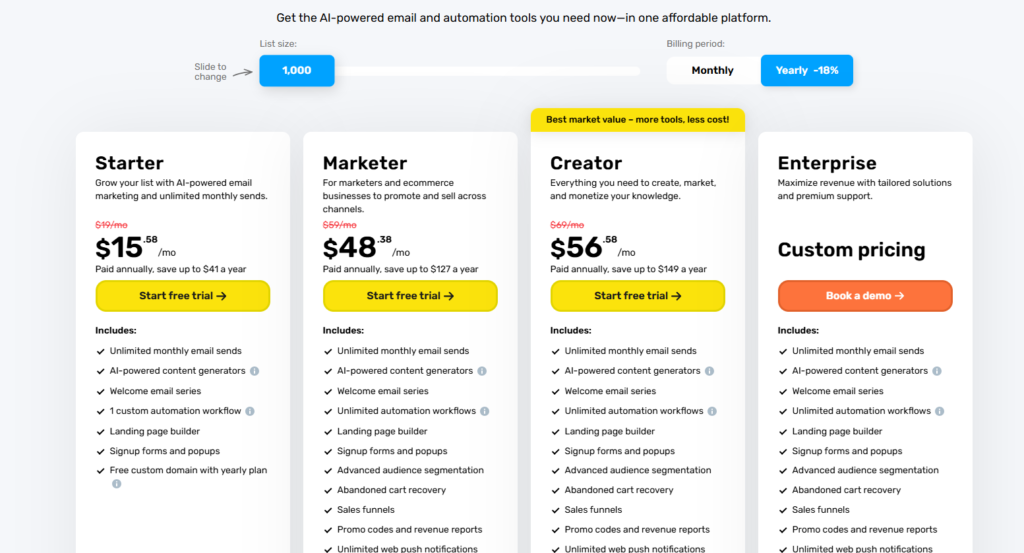
GetResponse Pricing
Pricing is competitive compared with other email marketing software.
Typical plans include:
| Plan | Starting Price |
|---|---|
| Starter | around $19/month |
| Marketer | around $59/month |
| Creator | around $69/month |
Pricing increases based on the number of subscribers.
Pros and Cons of GetResponse
| Pros | Cons |
| Powerful automation workflows | Slight learning curve |
| Built-in marketing funnels | Interface can feel complex for beginners |
| Webinar hosting features | |
| Good deliverability rates |
Who GetResponse Is Best For
GetResponse is ideal for:
- bloggers building funnels
- affiliate marketers
- online course creators
- businesses running automated campaigns
If you want advanced marketing automation, GetResponse is often the better choice.
Mailchimp Features
Easy Campaign Builder
Mailchimp is known for its simple interface.
You can create campaigns in minutes using:
- drag-and-drop builder
- pre-designed templates
- beginner-friendly dashboard
Many small businesses start with Mailchimp because it’s easy to learn.
Email Templates and Design
Mailchimp offers more than 100 templates.
Design features include:
- customizable layouts
- brand style tools
- image editing tools
This helps beginners create professional emails quickly.
detailed ActiveCampaign review
Audience Management
Mailchimp includes built-in tools for:
- subscriber segmentation
- tagging contacts
- audience insights
These features help improve email marketing performance.
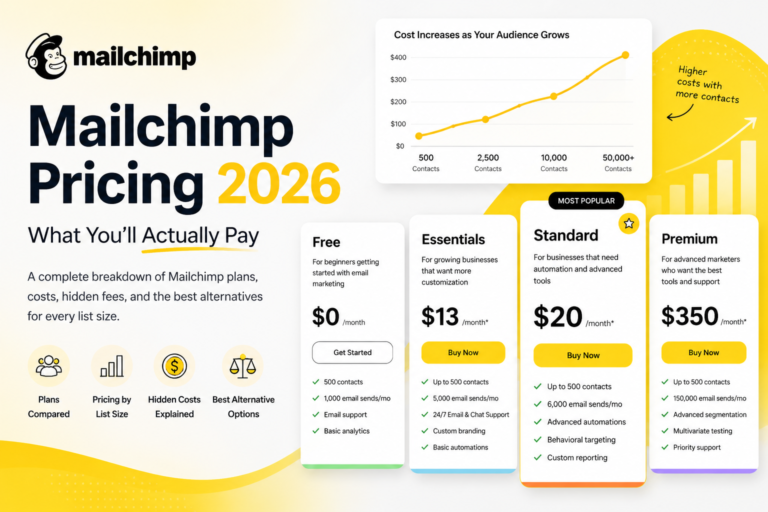
Mailchimp Pricing
Mailchimp offers a free plan, which is one reason many beginners start with it.
Typical pricing:
| Plan | Starting Price |
|---|---|
| Free | up to 500 contacts |
| Essentials | around $13/month |
| Standard | around $20/month |
| Premium | higher for large lists |
However, pricing becomes expensive as your email list grows.
Pros and Cons of Mailchimp
| Pros | Cons |
| very beginner friendly | automation is limited |
| free plan available | pricing increases quickly |
| clean interface | fewer funnel tools |
| large integration ecosystem |
Who Mailchimp Is Best For
Mailchimp works best for:
- small businesses
- beginners learning email marketing
- bloggers starting their first email list
If you want a simple email marketing tool, Mailchimp is a solid option.
Automation Comparison
Automation is where the biggest difference appears in the GetResponse vs Mailchimp comparison.
GetResponse Automation
- visual workflow builder
- behavior-based triggers
- advanced segmentation
- multi-step email sequences
Mailchimp Automation
- simple welcome emails
- basic triggers
- limited workflows
Winner: GetResponse
It provides much more advanced marketing automation tools.
affordable email marketing tools
Deliverability and Email Performance
Email deliverability determines whether your emails reach the inbox.
Both platforms maintain strong reputations.
Factors affecting deliverability include:
- sender reputation
- email list quality
- authentication settings
Both platforms perform well, but some tests show Mailchimp slightly ahead in deliverability consistency.
Landing Pages and Funnels
Another difference in the GetResponse vs Mailchimp comparison is landing pages.
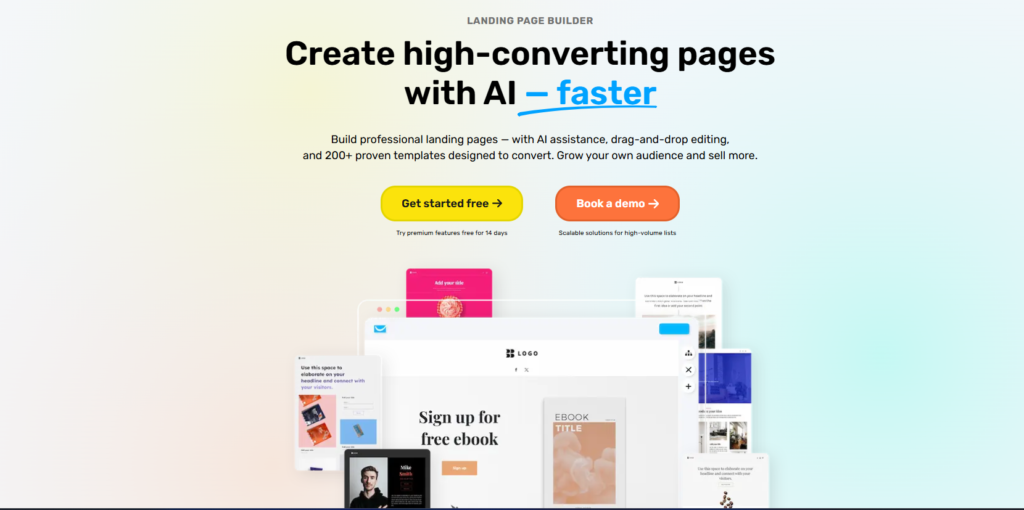
GetResponse
- full landing page builder
- funnel templates
- sales funnels
- webinar pages
Mailchimp
- simple landing pages
- limited customization
GetResponse
It provides more tools for lead generation and marketing funnels.
Ease of Use
Ease of use matters for beginners starting email marketing.
Mailchimp
- simple interface
- quick setup
- intuitive design
GetResponse
- more powerful
- slightly steeper learning curve
Winner for beginners: Mailchimp
email marketing software comparison
Final Verdict: GetResponse vs Mailchimp
Both platforms are strong email marketing tools, but they serve different users.
Choose GetResponse if you want:
- advanced marketing automation
- sales funnels
- webinar features
- powerful email workflows
Choose Mailchimp if you want:
- a simple beginner-friendly platform
- a free plan to start
- easy email campaign creation
For bloggers, affiliate marketers, and businesses planning to scale their marketing, GetResponse usually offers more long-term value.
However, beginners who want to start quickly may prefer Mailchimp’s simplicity.
The best approach is to test both platforms and choose the one that fits your email marketing strategy and growth goals.
Is GetResponse better than Mailchimp?
GetResponse is better for advanced automation and funnels, while Mailchimp is better for beginners who want a simple email marketing tool.
Which platform is cheaper?
Mailchimp offers a free plan, but GetResponse often becomes more affordable when your subscriber list grows.
Does GetResponse have better automation?
Yes. GetResponse provides advanced visual workflows and marketing automation features that are stronger than Mailchimp.
Can I migrate from Mailchimp to GetResponse?
Yes. Most email marketing platforms provide migration tools or integrations that allow you to move subscribers and campaigns easily.
Which email marketing tool is best for beginners?
Mailchimp is easier for beginners due to its simple interface, but GetResponse is better if you want long-term automation features.
Conclusion: GetResponse vs Mailchimp
Choosing between GetResponse vs Mailchimp ultimately depends on your marketing goals, experience level, and the type of tools you need to grow your email list.
If you’re a beginner starting your first email marketing campaign, Mailchimp is often easier to use. Its clean interface, simple campaign builder, and free plan make it a good starting point for small businesses and bloggers who want to send newsletters quickly.
However, if you’re planning to build automated email funnels, sell products, or scale your marketing, GetResponse provides significantly more advanced tools. Features like visual automation workflows, built-in marketing funnels, and landing page builders make it a more powerful platform for long-term growth.
Here’s a quick recommendation:
Choose GetResponse if you want:
- advanced email automation
- marketing funnels and landing pages
- better tools for affiliate marketing and sales
- scalable email marketing features
Choose Mailchimp if you want:
- a beginner-friendly email platform
- a free plan to test email marketing
- simple newsletter campaigns
In many real-world tests, marketers eventually move from Mailchimp to more advanced tools as their email marketing strategy grows. For that reason, GetResponse often provides better long-term value for serious marketers.
Now that you understand the key differences between these two platforms, you can choose the email marketing software that best fits your business needs.