Hostinger Horizons Review: My Honest Experience After Testing It
This Hostinger Horizons review covers everything I found after actually building a website with the tool, from pricing to real limitations no one talks about.
Hostinger Horizons is an AI-powered, no-code website and web app builder that turns plain text prompts into a working site, complete with hosting, a domain, and SSL included.
If you’re wondering whether it’s worth your money, the short answer is yes, but only for a specific type of user. Hostinger Horizons works best for beginners, small business owners, and non-technical founders who want a functional website fast. It’s not built for developers who need full control over their code, or for anyone building a complex, large-scale application.
In this review, I’ll walk through what it’s actually like to use, how much it costs, what it does well, where it falls short, and how it compares to other AI website builders like Lovable and Bolt. By the end, you’ll know exactly whether Hostinger Horizons fits what you’re trying to build.
If you’re building a site for your business, pairing it with the right email marketing tool is the next step once your site is live.
What Is Hostinger Horizons?
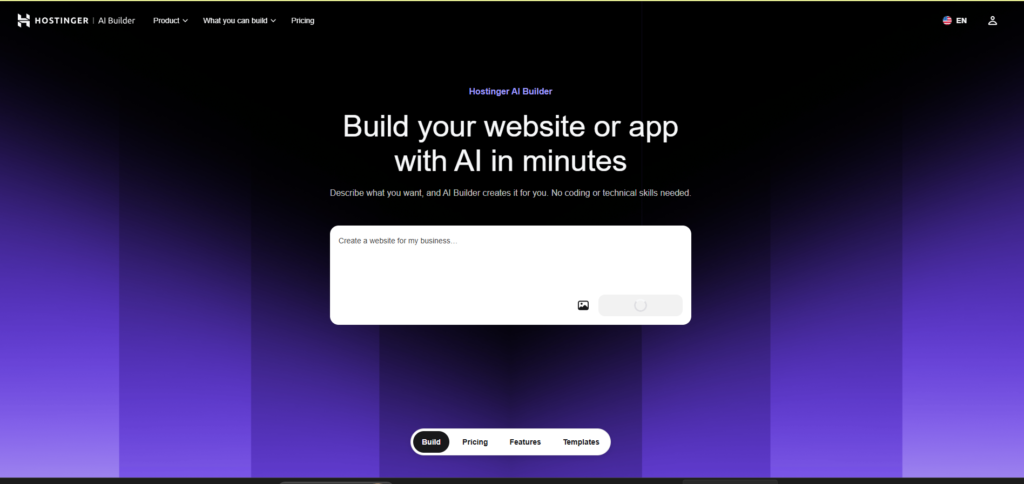
Hostinger Horizons is an AI-powered, no-code tool that builds websites and web apps from plain text prompts.
You describe what you want to build in your own words. The AI then writes the code, designs the layout, and puts the whole thing together in real time.
It was launched by Hostinger, the same company known for web hosting and domain services. Because of that, Horizons comes bundled with hosting, a free domain option, and SSL security built right in.
Unlike a typical website builder, you don’t drag and drop elements or pick from templates. You just chat with the AI, and it edits, adjusts, and rebuilds parts of your site as you ask.
Horizons supports over 80 languages, so you can prompt it in your native language and still get clean, working code back.
It’s aimed mainly at beginners, small business owners, and non-technical founders who want a working website or app without hiring a developer.
If you’re also deciding on a hosting provider, we compared Hostinger vs Namecheap in a separate breakdown
How I Tested Hostinger Horizons (Real Build Walkthrough)
Signing Up and First Impressions
Getting started with Hostinger Horizons took less than a minute. There’s no long setup form or account wizard.
After signing up, I landed straight on a chat-style interface. It felt more like messaging an assistant than using a website builder.
Building My First Web App With a Prompt
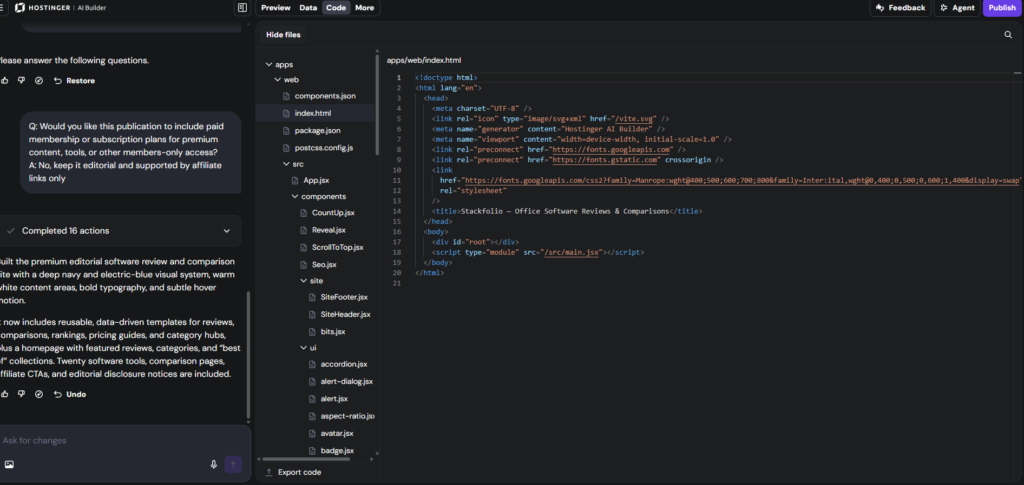
I typed a simple prompt describing the type of site I wanted, including its purpose and a few key features.
Within moments, Hostinger Horizons generated a working layout with a homepage, navigation, and basic structure already in place.
No coding was needed at any point. The AI handled the layout, styling, and functionality based on what I described.
Editing, Fixing, and Refining the Result
Once the first version was ready, I asked the AI to make changes, like adjusting colors, adding a new section, and tweaking the wording.
Each change applied almost instantly, and I could see the update happen live on the page.
When something didn’t look right, I simply explained the issue in plain language, and Horizons corrected it without needing technical instructions.
Hostinger Horizons Pricing
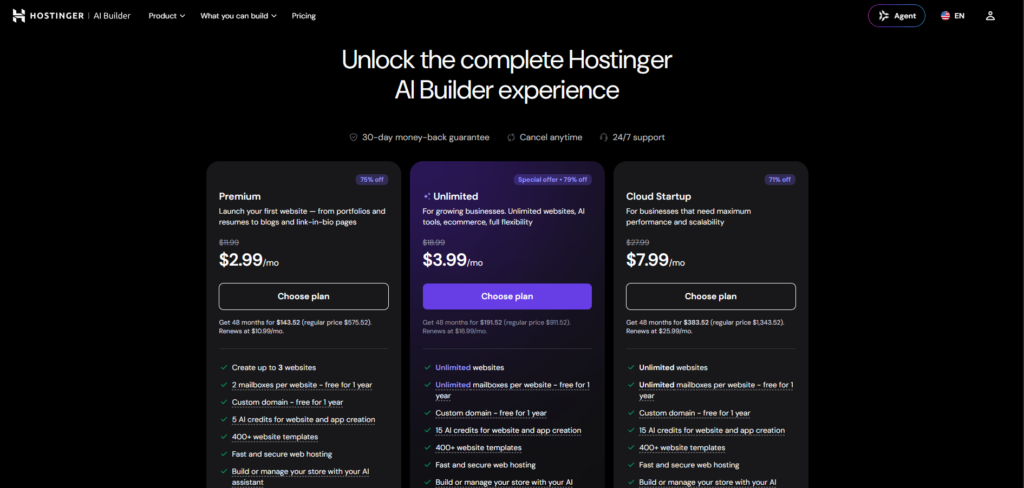
Hostinger Horizons pricing is based on a credit system rather than flat monthly fees.
Credits are used every time you send a prompt or ask the AI to make changes. Higher plans give you more credits per month, along with extra features like code editor access.
There’s no free plan, but Hostinger offers a 7-day free trial with a limited number of daily prompts, so you can test the tool before paying.
Paid plans start at around $6.99 per month for basic use, and go up to around $79.99 per month for higher credit limits and advanced features.
| Plan | Price | Best For |
|---|---|---|
| Starter | $6.99/mo | Beginners testing a single project |
| Hobbyist | Mid-tier pricing | Small businesses needing code editing |
| Hustler / Pro | Up to $79.99/mo | Heavy usage and advanced features |
Since Hostinger updates pricing and plan names from time to time, it’s worth double-checking the exact current numbers on their pricing page before publishing, so the article stays accurate.
Key Features of Hostinger Horizons Review
AI Prompt-Based Building
Hostinger Horizons builds your entire site from plain-language prompts. You describe what you want, and the AI writes the code and layout for you.
You can also refine the result by chatting back and forth, without touching any code yourself.
Built-In Hosting, Domain, and SSL
Every site built with Hostinger Horizons comes with hosting already included. You don’t need to connect a separate hosting provider.
SSL security is applied automatically, and you can connect a custom domain or use one through Hostinger directly.
Code Editor Access
For users who want more control, Hostinger Horizons includes a code editor on its higher-tier plans.
This lets you manually adjust the code the AI generates, which is useful once a project grows beyond simple prompt-based edits.
Multilingual Prompting
Hostinger Horizons supports prompts in over 80 languages. You can describe your project in your native language and still get accurate, working results.
This makes it accessible to a much wider range of users than most AI website builders, which are often limited to English prompts.
Pros and Cons
Here’s the comparison table, built with better styling and accurate current data.
Pros
Cons
One important note on the numbers: pricing for all three tools changes often, and both Lovable and Bolt use credit or token systems that make the “real” monthly cost higher than the sticker price once you’re actively building. It’s worth adding a line under the table telling readers to confirm current pricing on each provider’s official page, this protects the article’s accuracy over time and is the kind of caveat AI answer engines favor when citing pricing claims.
Hostinger Horizons vs Lovable vs Bolt
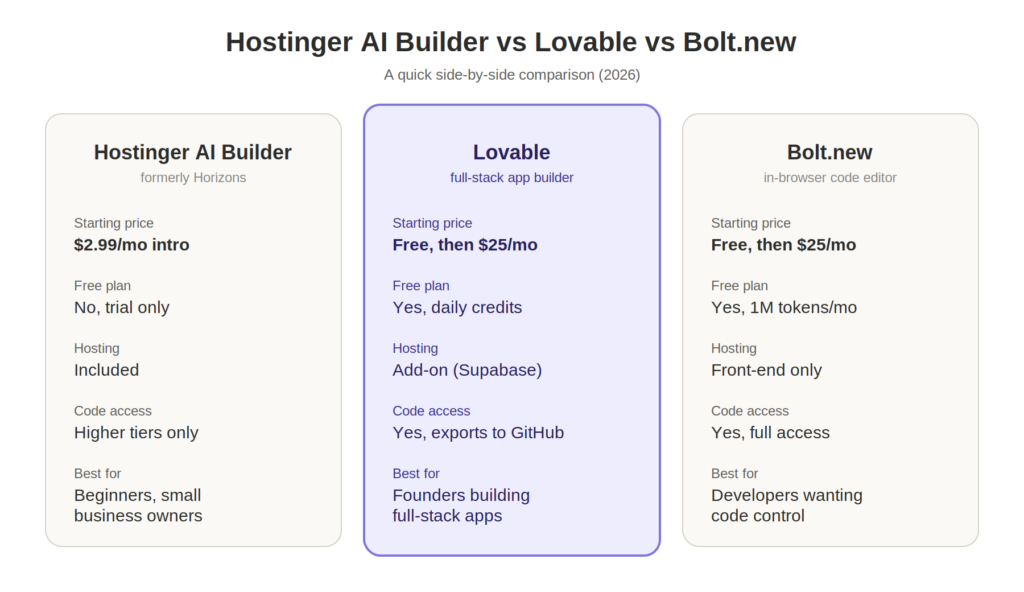
These three tools all fall under the same “describe it and AI builds it” category, but they’re built for very different types of users. Here’s how they actually compare once you look past the marketing pages.
How Each One Approaches Building
Hostinger Horizons keeps everything in one place. Hosting, domain, SSL, and the AI builder all live inside the same Hostinger ecosystem, so you never leave the platform to launch a live site.
Lovable takes a more technical approach under the hood. It generates a real React app connected to a Supabase backend, complete with authentication and a database schema. That makes it more powerful, but it also means you’re managing more moving parts.
Bolt.new works inside your browser using a live coding environment called WebContainers. It shows you the actual code as it’s generated, and you can edit that code directly at any point. It feels closer to a lightweight IDE than a simple chat-based builder.
Who Each Tool Is Really Built For
Hostinger Horizons is built for people who don’t want to think about infrastructure at all. If you just want a working site or simple app without managing hosting, backend services, or deployment settings, it removes almost all of that decision-making.
Lovable fits people building something closer to a real product, especially if it needs user accounts, a database, or backend logic. It’s popular with founders prototyping a startup idea before handing it off to a developer.
Bolt.new suits people who are at least somewhat comfortable around code, or who plan to get there. Since it exposes the underlying code by default, it works well for developers who want AI to handle the first draft while they finish the details themselves.
Pricing Philosophy Is Genuinely Different
Hostinger Horizons prices around simplicity. You pick a plan, you get a set number of credits, and the price includes hosting and domain costs that you’d otherwise pay for separately.
Lovable and Bolt both use consumption-based pricing, credits for Lovable, tokens for Bolt, which means your real monthly cost depends heavily on how much you build and how often you retry failed generations. Several independent pricing breakdowns note that both tools often end up costing more in practice than their advertised starting price once someone is actively building a project.
This is a meaningful difference. With Hostinger Horizons, the price you see is closer to the price you pay. With Lovable and Bolt, the sticker price is really a starting point.
Backend and Infrastructure
This is where the gap is widest. Hostinger Horizons handles hosting and infrastructure for you automatically, so there’s nothing extra to configure.
Lovable requires a connected backend service (Supabase) for anything beyond a static front end, which is included but adds a layer you need to understand.
Bolt.new is front-end first. For real backend logic, most builders still need to wire in a separate service themselves, which adds both cost and complexity that isn’t obvious from the pricing page alone.
Depth of Customization
Hostinger Horizons intentionally limits deep customization on lower plans. Full code editing is locked behind higher tiers, which keeps things simple but caps what advanced users can do without upgrading.
Lovable and Bolt both give more direct access to the underlying code from the start, which makes them better suited to projects that will keep growing in complexity over time.
The Bottom Line
If your priority is speed, simplicity, and an all-in-one bundle with predictable pricing, Hostinger Horizons is the easier choice. If you’re building something more complex, need a real backend, or want full code ownership from day one, Lovable or Bolt will likely serve you better, at the cost of more moving parts and a less predictable bill.
Who Should Use Hostinger Horizons
Hostinger Horizons is best suited for people who want a working website or web app without learning to code.
If you’re a small business owner who needs a simple site up quickly, like a booking page, portfolio, or landing page, this tool handles the technical side for you.
It also works well for beginners testing an idea. You can describe a concept, see it built in minutes, and decide if it’s worth developing further before investing more time or money.
Non-technical founders benefit from it too, especially in the early stages of a project. It lets you get a functional prototype live without hiring a developer first.
Freelancers who build simple sites or tools for clients may also find it useful, since hosting, domain, and SSL are already included, which saves setup time on every project.
In short, Hostinger Horizons fits anyone who values speed and simplicity over deep customization.
Who Should Avoid It
Hostinger Horizons is not built for experienced developers who need full control over their code from the start.
If your project requires custom backend logic, complex database structures, or deep API integrations, you’ll likely hit limitations faster than expected.
Large agencies building for multiple clients at scale may also find it too restrictive, since advanced features are locked behind higher-tier plans, and the credit system limits heavy daily use.
Anyone planning to build a native mobile app should avoid it too. Hostinger Horizons doesn’t support mobile app export, so your project stays web-based only.
If you need unlimited AI prompts or unrestricted editing, the credit-based system will likely feel limiting rather than freeing.
In short, Hostinger Horizons isn’t the right fit for advanced developers, large-scale projects, or anyone needing mobile app development.
Is Hostinger Horizons Worth It?
Yes, Hostinger Horizons is worth it if you fall into the group it’s built for: beginners, small business owners, and non-technical founders who want a working website or web app without writing code.
The value comes from what’s bundled in. Hosting, a domain option, and SSL are all included in the price, so you’re not paying separately for services most competitors leave out.
It’s also worth it if speed matters more to you than deep customization. Most simple projects come together in minutes, not days, which is hard to match even with traditional website builders.
Where it stops being worth it is if you need advanced backend functionality, unrestricted AI usage, or plans to build something that will scale into a large, complex application. In that case, the credit limits and locked-off code editor will likely get in your way.
So the real answer depends on the project. For a simple, fast, affordable website or app, Hostinger Horizons delivers solid value. For anything bigger or more technical, it’s better used as a starting point than a long-term solution.
Is Hostinger Horizons free?
Do I need coding skills to use Hostinger Horizons?
Can I use my own domain with Hostinger Horizons?
Does Hostinger Horizons include hosting?
What can you build with Hostinger Horizons?
Can I edit the code myself in Hostinger Horizons?
Final Verdict
Hostinger Horizons delivers on its core promise: it lets you build a working website or web app from a simple text prompt, with hosting, a domain, and SSL bundled in from day one.
After testing it, the strongest impression is how little friction there is. There’s no setup wizard, no separate hosting decision, and no need to touch code unless you choose to. For beginners, small business owners, and non-technical founders, that simplicity is the real selling point.
It’s not the right fit for everyone. Developers who need deep backend control, unrestricted AI usage, or mobile app export will hit its limits quickly, and the credit system means heavy users will need to budget carefully.
But judged against what it sets out to do, build simple, functional websites and apps fast, Hostinger Horizons holds up. It’s an affordable, beginner-friendly entry point into AI-powered web building, and for the right use case, it’s genuinely worth trying.