ConvertKit vs Mailchimp 5 Honest Pros & Cons (2026)
Choosing the wrong email marketing tool can waste time and money fast. In this ConvertKit vs Mailchimp comparison, you’ll quickly see which platform fits your needs based on real features, pricing, and performance.
Both tools are popular, but they are built for different users. ConvertKit focuses on simplicity and creators, while Mailchimp offers more advanced marketing tools and design flexibility.
In this ConvertKit vs Mailchimp guide, you’ll discover the key differences, pros and cons, and which platform is the better choice for your business in 2026.
ConvertKit vs Mailchimp: Features
ConvertKit vs Mailchimp, features are one of the biggest deciding factors. Both platforms offer powerful email marketing tools, but they are built for different types of users.
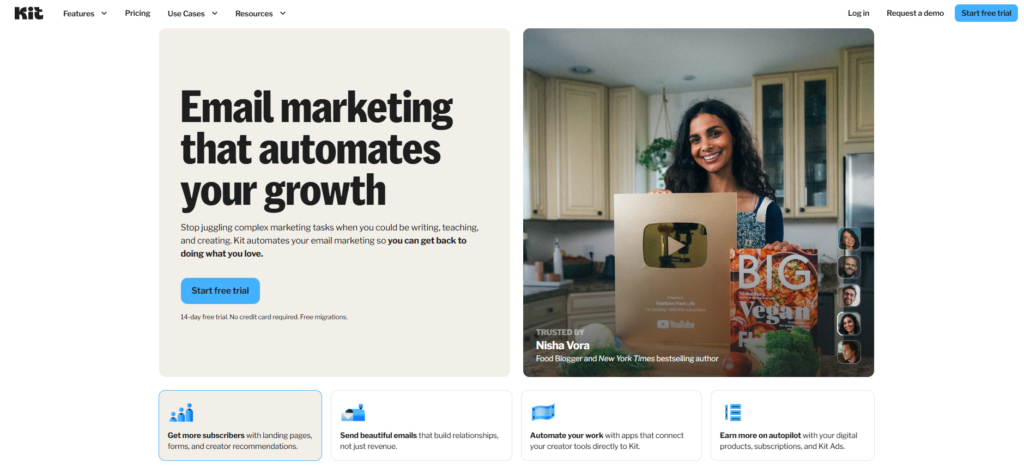
ConvertKit focuses on simplicity and creators. It offers clean email building, subscriber tagging, and strong automation tools without overwhelming you. You can easily create forms, landing pages, and email sequences. The platform is designed for bloggers, creators, and small businesses who want to grow an audience and sell digital products.
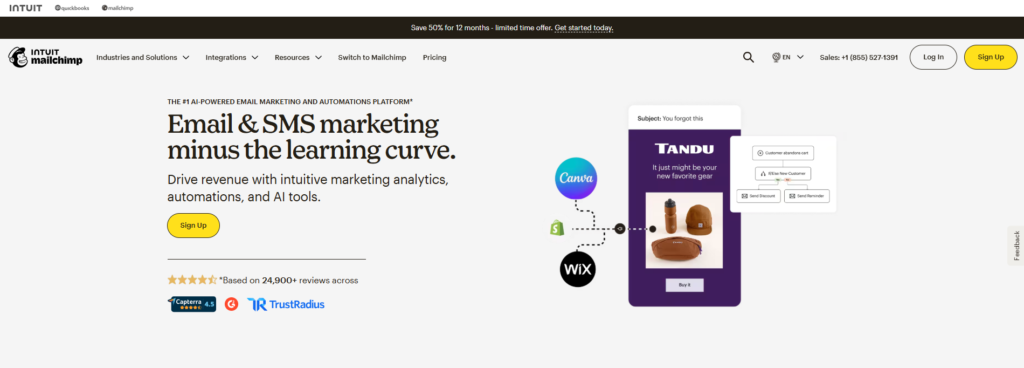
Mailchimp, on the other hand, is more feature-rich and built for a wider audience. It includes advanced templates, detailed audience segmentation, A/B testing, and built-in marketing tools like social media ads and basic CRM features. It’s better suited for businesses that want an all-in-one marketing platform.
One key difference in ConvertKit vs Mailchimp is how they manage subscribers. ConvertKit uses a tag-based system, which keeps your audience organized without duplicates. Mailchimp uses lists, which can sometimes lead to duplicate contacts and higher costs.
Another important feature difference is email design. Mailchimp offers drag-and-drop templates with more design flexibility. ConvertKit keeps things minimal with mostly text-based emails that feel more personal and often perform better for engagement.
In short, if you want simple, creator-focused tools, ConvertKit is a strong choice. If you need advanced marketing features and design options, Mailchimp has the edge.
ConvertKit vs Mailchimp: Ease of Use
ConvertKit vs Mailchimp, ease of use is a major factor—especially for beginners.
ConvertKit is known for its simplicity. The interface is clean, minimal, and easy to navigate. You can quickly create emails, forms, and automation without confusion. This makes it a great choice for creators, bloggers, and beginners who want to get started fast without a learning curve.
Mailchimp is also user-friendly, but it has more features. Because of this, the dashboard can feel a bit overwhelming at first. However, it offers a drag-and-drop editor, which makes designing emails very easy even for non-technical users.
Another key difference in ConvertKit vs Mailchimp is how quickly you can launch campaigns. ConvertKit allows you to set up emails faster because of its simple structure. Mailchimp takes more time since it offers more customization and advanced tools.
In terms of learning curve, ConvertKit is easier for beginners, while Mailchimp may take longer to master but offers more flexibility once you understand it.
Final thought:
If you want a simple and fast experience, ConvertKit is the better choice. If you prefer more control and design options, Mailchimp is worth the extra learning time.
ConvertKit vs Mailchimp: Automation
Both tools offer automation, but they are built in very different ways.
ConvertKit focuses on simple but powerful automation. It uses a visual automation builder that is easy to understand. You can create workflows based on actions like form sign-ups, clicks, or purchases. Adding tags, moving subscribers, and triggering email sequences is very smooth. This makes it ideal for creators who want automation without complexity.
Mailchimp also offers automation, but it is more advanced and feature-heavy. You can build customer journeys with multiple conditions, triggers, and actions. It supports things like abandoned cart emails, product recommendations, and behavior-based targeting. However, it can feel more complicated, especially for beginners.
A key difference in ConvertKit vs Mailchimp is flexibility vs simplicity. ConvertKit keeps automation clean and easy to manage. Mailchimp gives you more options, but it takes more time to set up and optimize.
Another important point is personalization. Mailchimp allows deeper segmentation and advanced targeting inside automation. ConvertKit focuses more on tag-based personalization, which is easier but slightly less detailed.
In short, if you want simple and effective automation, ConvertKit is the better choice. If you need advanced workflows and detailed targeting, Mailchimp has more power.
ConvertKit vs Mailchimp: Pricing
ConvertKit vs Mailchimp, pricing can be a big deciding factor—especially as your email list grows.
Both platforms offer free plans, but there is a clear difference. ConvertKit provides a more generous free plan with up to 10,000 subscribers, while Mailchimp limits free users to around 500 contacts and fewer email sends.
On paid plans, both tools use subscriber-based pricing, meaning the cost increases as your list grows. However, their pricing structures are slightly different.
ConvertKit keeps pricing simple. It has two main plans:
- Creator (starting around $15–$25/month)
- Creator Pro (starting around $29–$50/month)
Pricing scales based on subscribers, and all core features like automation are included early.
Mailchimp uses more tiers:
- Free
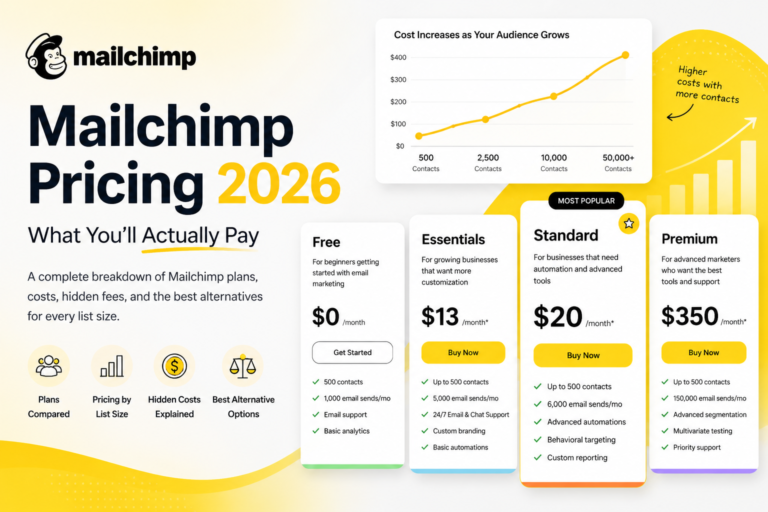
- Essentials (from ~$13/month)
- Standard (from ~$20/month)
- Premium (from ~$350/month)
More advanced features are locked behind higher plans, which can increase costs over time.
A key difference in ConvertKit vs Mailchimp is how they charge for contacts. ConvertKit only charges for active subscribers, while Mailchimp may count all contacts, including unsubscribed users. This can make Mailchimp more expensive as your list grows.
At smaller list sizes, Mailchimp can be cheaper. But as your audience grows (5,000+ subscribers), ConvertKit often becomes more cost-effective.
Final thought:
If you want a generous free plan and predictable pricing, ConvertKit is a better choice. If you need advanced marketing tools and don’t mind upgrading, Mailchimp can be worth it.
ConvertKit vs Mailchimp: Email Templates & Design
ConvertKit vs Mailchimp, email templates and design are very different. Each platform takes a unique approach.
ConvertKit keeps things simple. It focuses on clean, text-based emails that look more personal. You get a few basic templates, but the goal is not heavy design. These emails often feel like personal messages, which can improve engagement and open rates.
Mailchimp is built for design. It offers a wide range of ready-made templates and a powerful drag-and-drop editor. You can easily add images, columns, buttons, and branding elements. This makes it a better choice for businesses that want visually rich emails.
A key difference in ConvertKit vs Mailchimp is flexibility. ConvertKit limits design options to keep things simple and fast. Mailchimp gives you full control over layout and style, but it can take more time to create emails.
Another important point is branding. Mailchimp makes it easier to create emails that match your brand with colors, logos, and layouts. ConvertKit focuses more on content and message rather than design.
In short, if you want simple, personal emails that convert, ConvertKit is a great choice. If you need professional, highly designed emails, Mailchimp is the better option.
ConvertKit vs Mailchimp: Deliverability & Performance
deliverability and performance are critical. If your emails don’t reach the inbox, nothing else matters.
Both platforms have strong deliverability rates, but there are small differences.
ConvertKit is known for very consistent inbox placement. Many tests show it reaching around 95%–98% inbox rates, with strong sender reputation and fewer spam issues.
Mailchimp also performs well, usually around 94%–97% deliverability, but results can vary more—especially on lower plans using shared IP addresses.
A key difference in ConvertKit vs Mailchimp is consistency. ConvertKit focuses on permission-based email marketing, which helps maintain a clean list and better inbox placement. Mailchimp’s larger user base can sometimes affect performance due to shared sending environments.
Performance (Open Rates & Click Rates)
Performance goes beyond delivery. It includes opens, clicks, and conversions.
- ConvertKit emails often get 20–35% open rates and higher engagement, especially for creators.
- Mailchimp emails typically get 18–30% open rates, depending on the industry and design.
In some tests, ConvertKit achieved higher open rates (25%+) and better ROI, mainly due to its simple, text-based emails.
This happens because ConvertKit emails feel more personal, while Mailchimp emails often look more promotional.
What Affects Deliverability
No matter which tool you choose, performance depends on:
- Email list quality
- Engagement (opens & clicks)
- Sending frequency
- Email content (spam triggers)
Even the best platform can perform poorly if your list is not clean.
Final Thought
In ConvertKit vs Mailchimp, both tools deliver strong performance.
- Choose ConvertKit if you want better consistency and higher engagement
- Choose Mailchimp if you need advanced tracking and design-based campaigns
ConvertKit vs Mailchimp: Integrations & Support
integrations and support play a big role—especially if you use multiple tools or need quick help.
Integrations
Mailchimp clearly leads in integrations. It supports 300+ apps and services, including CRM tools, eCommerce platforms, social media, and analytics tools.
This makes Mailchimp a strong choice if you run a business that uses many tools together, like Shopify, WordPress, or advanced CRM systems.
ConvertKit also offers integrations, but fewer—around 100–125+ apps.
It connects well with popular tools like Shopify, Teachable, and Zapier. It also provides an API for custom integrations. However, it is more focused on creators rather than large marketing systems.
Key difference in ConvertKit vs Mailchimp:
- ConvertKit = simple, creator-focused integrations
- Mailchimp = wide ecosystem with more flexibility
Support
Both platforms offer solid support, but there are differences.
ConvertKit provides:
- Email support
- Live chat (on paid plans)
- Knowledge base, tutorials, and community
Support is known for being fast and helpful, especially for creators.
Mailchimp offers more support options:
- Email support (free plan for limited time)
- Live chat (paid plans)
- Phone support (premium plans only)
- Large help center and guides
This makes Mailchimp better for users who want multiple support channels, especially phone support.
Final Thought
In ConvertKit vs Mailchimp, both tools perform well but serve different needs:
- Choose ConvertKit if you want simple integrations and fast, creator-focused support
- Choose Mailchimp if you need more integrations and advanced support options like phone help
ConvertKit vs Mailchimp: Detailed Features Comparison
| Feature | ConvertKit | Mailchimp |
|---|---|---|
| Core Focus | Creator-focused ⭐⭐⭐⭐⭐ | All-in-one marketing ⭐⭐⭐⭐ |
| Ease of Use | Very easy ⭐⭐⭐⭐⭐ | Moderate ⭐⭐⭐⭐ |
| Email Automation | Simple & visual ⭐⭐⭐⭐ | Advanced workflows ⭐⭐⭐⭐⭐ |
| Subscriber Management | Tag-based ⭐⭐⭐⭐⭐ | List-based ⭐⭐⭐ |
| Email Templates | Minimal ⭐⭐⭐ | 100+ templates ⭐⭐⭐⭐⭐ |
| Design Flexibility | Limited ⭐⭐⭐ | Highly flexible ⭐⭐⭐⭐⭐ |
| Landing Pages | Simple builder ⭐⭐⭐⭐ | More design options ⭐⭐⭐⭐ |
| A/B Testing | Basic ⭐⭐⭐ | Advanced ⭐⭐⭐⭐⭐ |
| Personalization | Tag-based ⭐⭐⭐⭐ | Deep targeting ⭐⭐⭐⭐⭐ |
| Analytics & Reporting | Basic ⭐⭐⭐ | Advanced ⭐⭐⭐⭐⭐ |
| Monetization Tools | Strong for creators ⭐⭐⭐⭐⭐ | Limited ⭐⭐⭐ |
| Integrations | 100+ ⭐⭐⭐⭐ | 300+ ⭐⭐⭐⭐⭐ |
| Support | Fast & helpful ⭐⭐⭐⭐ | More options ⭐⭐⭐⭐ |
Quick Insight
- ConvertKit wins in simplicity, creator tools, and subscriber management
- Mailchimp wins in design, analytics, and advanced features
ConvertKit vs Mailchimp comparison, both platforms are strong—but they serve different users.
ConvertKit is the better choice if you want simplicity, clean automation, and tools built for creators. It’s easy to use, cost-effective as you grow, and great for building a loyal audience.
Mailchimp is ideal if you need advanced features, detailed analytics, and more design flexibility. It works well for businesses that want an all-in-one marketing platform.
👉 Final verdict:
- Choose ConvertKit for simplicity, automation, and creator-focused tools
- Choose Mailchimp for advanced marketing features and design control
Your choice depends on your goals. If you want fast setup and high engagement, go with ConvertKit. If you need more control and advanced tools, Mailchimp is the better option.
Is ConvertKit better than Mailchimp?
ConvertKit is better for creators and beginners who want simple automation and easy email marketing. Mailchimp is better for businesses that need advanced features and detailed analytics.
Which is cheaper, ConvertKit or Mailchimp?
Mailchimp can be cheaper at the beginning with its lower entry plans. However, ConvertKit often becomes more cost-effective as your subscriber list grows.
Which platform is easier to use?
ConvertKit is easier to use because of its clean and simple interface. Mailchimp has more features, which can make it slightly harder for beginners.
Which has better automation, ConvertKit or Mailchimp?
Mailchimp offers more advanced automation and customer journeys. ConvertKit focuses on simple and effective automation that is easier to manage.