Klaviyo Pricing Plans 2026: The Complete Breakdown
Klaviyo is one of the most powerful email platforms for ecommerce — but it’s also one of the easiest to overpay for.
In 2025, Klaviyo quietly changed how it bills customers. Instead of charging only for contacts you actually email, it now charges for every active profile in your account — whether you emailed them or not. Thousands of store owners opened their billing dashboard to find their monthly cost had jumped overnight.
This guide exists so that doesn’t happen to you.
We break down every Klaviyo plan, every pricing tier, SMS costs, hidden fees, and exactly what you’ll pay at every list size — so you can budget accurately, avoid surprises, and decide if Klaviyo is actually worth it for your business.
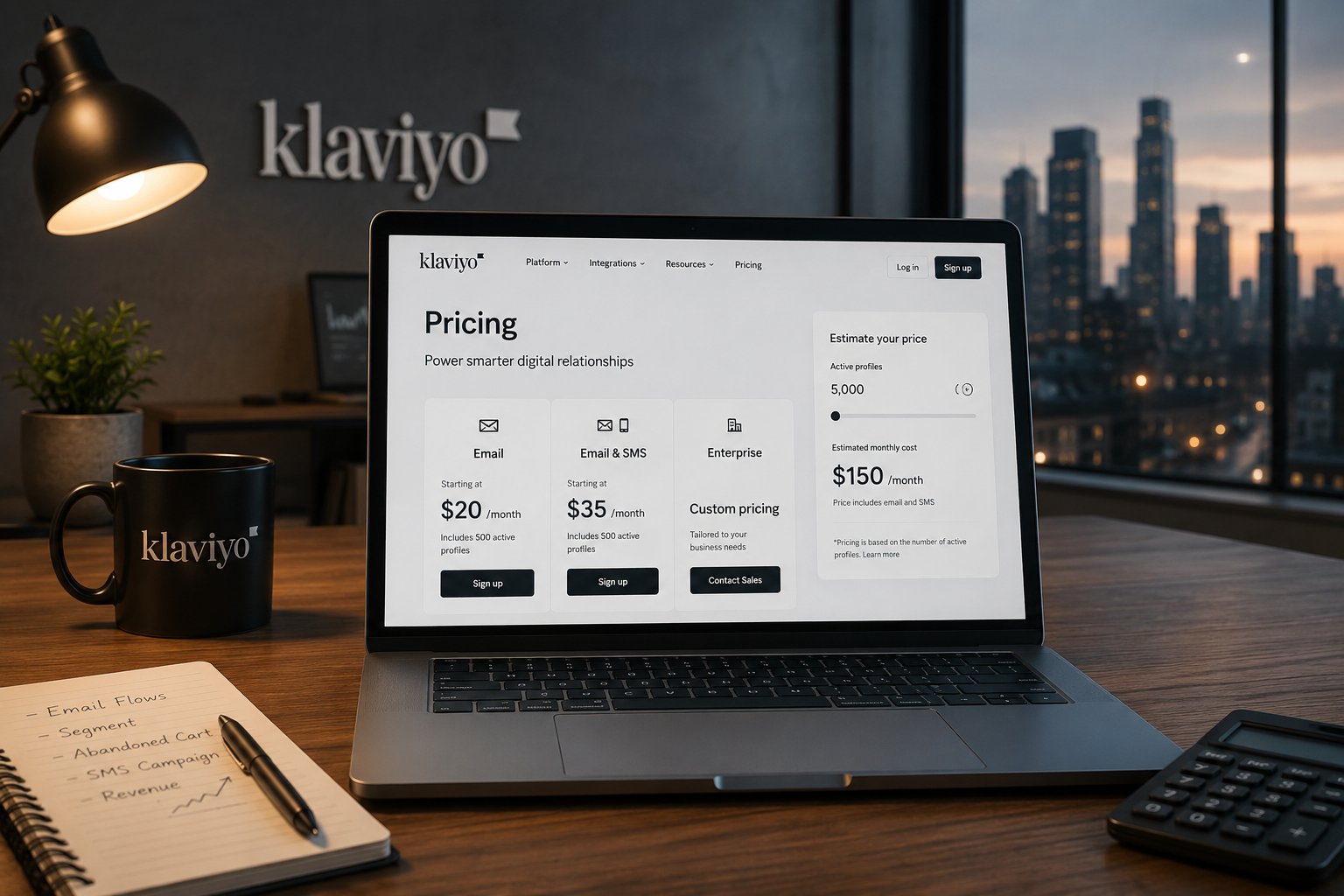
⚡ Quick Answer: Klaviyo’s paid plans start at $20/month for 251–500 active profiles. SMS starts at $15/month. There’s a free plan for up to 250 profiles with 500 email sends/month.
How Klaviyo Pricing Actually Works in 2026
Before you look at a single number on the pricing page, you need to understand how Klaviyo decides what to charge you.
Most people skip this part. Then they get their first bill and wonder why it’s higher than expected.
Here’s exactly how the system works.
Active Profiles The Number That Controls Your Bill
Klaviyo doesn’t charge you per email sent. It charges you based on one number: your active profile count.
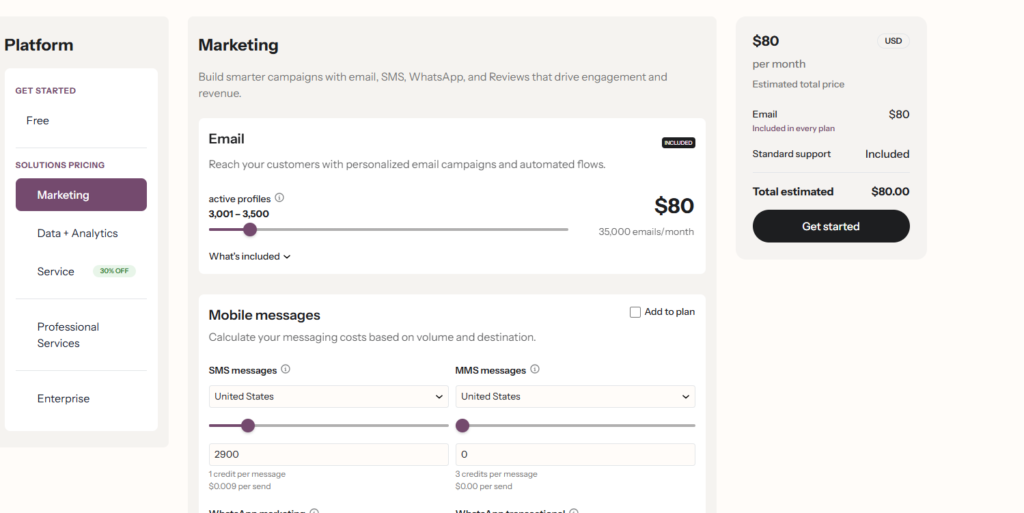
An active profile is any contact in your Klaviyo account that hasn’t been suppressed. That includes:
- Contacts who are subscribed and engaged
- Contacts who are subscribed but never open your emails
- Contacts who signed up but you’ve never emailed yet
- Contacts imported from a previous platform
It does not include:
- Unsubscribed contacts
- Hard bounces
- Contacts you’ve manually suppressed
📌 The key insight: You pay for the size of your list not the size of your audience that actually reads your emails.
This is why two businesses with the same number of active profiles can have wildly different engagement rates, but pay the exact same Klaviyo bill.
how Klaviyo defines active profiles
Email Billing vs SMS Billing Two Separate Systems
This is where a lot of people get confused.
Klaviyo runs email and SMS on completely separate billing systems. They don’t share a plan. They don’t combine into one number. You pay for each independently.
Here’s how each one works:
Email billing:
- Based on your total active email profiles
- Billed in tiers — the more profiles, the higher the tier
- All paid email plans include unlimited email sends
- One flat monthly fee per tier
SMS billing:
- Based on credits consumed, not profile count
- 1 SMS message = 1 credit
- 1 MMS message (with image) = 3 credits
- Credits reset every month — unused credits don’t roll over
If you use both email and SMS, your total monthly bill = email plan cost + SMS plan cost. Klaviyo does offer bundle discounts when you use both, but they remain two separate line items on your invoice.
The 2025 Pricing Model Change Nobody Warned You About
This is the part that caught thousands of Klaviyo users off guard.
Before 2025, Klaviyo billed based on the contacts you actively emailed. If you had 10,000 people on your list but only emailed 4,000 of them regularly, you were paying closer to the 4,000-contact tier.
That changed.
In 2025, Klaviyo switched to billing based on total active profiles — meaning every non-suppressed contact in your account, whether you email them or not.
The result for many stores looked like this:
A brand with 10,000 contacts but only 5,000 regularly emailed suddenly moved from a $110/month tier to a $215/month tier — with zero change in their sending behavior.
What you can do about it:
Klaviyo introduced an auto-downgrade feature specifically to help with this. It automatically suppresses contacts who haven’t engaged within a time period you set — removing them from your active profile count and potentially dropping you into a lower billing tier.
Enabling it takes two minutes and can save you hundreds per month on large lists. We cover exactly how to turn it on in the [How to Lower Your Klaviyo Bill] section below.
Klaviyo Free Plan Full Breakdown
Klaviyo’s free plan is one of the most generous in email marketing.
But it has limits that most people don’t notice until they hit them.
Here’s everything you need to know before you start building on it.
What’s Included in the Free Plan
The Klaviyo free plan gives you access to almost everything the paid plans offer — the core tools are all there.
What you get:
| Feature | Free Plan |
|---|---|
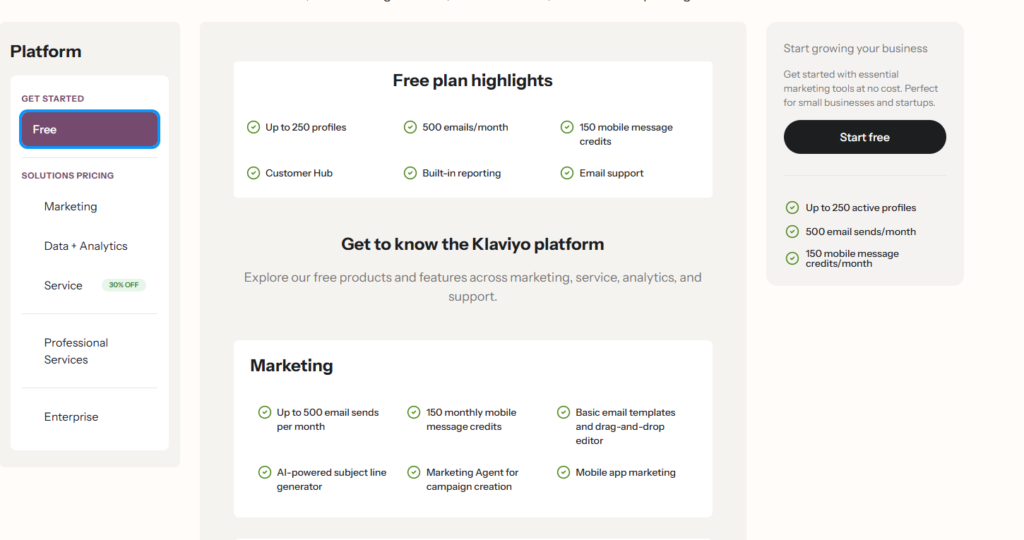
| Active profiles | Up to 250 |
| Monthly email sends | 500 emails/month |
| SMS credits | 150 credits/month |
| Email support | First 60 days only |
| Klaviyo branding on emails | Yes |
| Flows and automations | ✓ Full access |
| Segmentation | ✓ Full access |
| A/B testing | ✓ Full access |
| Analytics and reporting | ✓ Full access |
| Integrations (350+) | ✓ Full access |
| Sign-up forms | ✓ Full access |
| Templates | ✓ Full access |
What’s NOT Included The Limits People Miss
This is where most new users get tripped up.
The 500 email send cap is per month — not per contact.
That means if you have 250 contacts and send them 2 emails in a month, you’ve used all 500 sends. You can’t send another email until the next billing cycle.
Most people assume 500 sends means 500 contacts receiving one email. It doesn’t. It means 500 total sends across every campaign and automated flow combined.
Other limits worth knowing:
No email support after 60 days Once your first 60 days are up, support moves to chat only — and on the free plan, that means limited access. If you have a critical issue, resolution can be slow.
Klaviyo branding on every email Every email you send on the free plan includes “Sent with Klaviyo” in the footer. Small detail — but it matters if you’re building a professional brand.
150 SMS credits only That’s enough for roughly 150 text messages or 50 MMS messages per month. Fine for testing. Not enough for real SMS marketing.
No phone support Phone support is reserved for paid plans only.
Is the Klaviyo Free Plan Actually Useful?
Honestly yes, but only for a specific stage of your business.
The free plan makes sense if you:
Are just starting your store and building your first email list from scratch
Want to test Klaviyo’s automations and segmentation before committing to a paid plan
Have fewer than 250 subscribers and send less than 2 campaigns per month
Are migrating from another platform and want to explore the interface before paying
The free plan stops making sense when:
Your list grows past 250 active profiles — you’re automatically moved to $20/month
You want to run weekly campaigns — 500 sends runs out faster than you think
You need reliable support — after 60 days it becomes very limited
You care about removing Klaviyo branding from your emails
The bottom line on Klaviyo free plan pricing is straightforward. It’s a real product, not a stripped-down teaser. But the 500 send cap and 250 profile limit mean most growing stores will outgrow it within their first few months.
When you do hit that ceiling, the jump to $20/month is small — and you unlock unlimited sends immediately.
Klaviyo Email Pricing Plans 2026 (Complete Tier Table)
Klaviyo email pricing is simple in concept — the bigger your list, the more you pay.
But there are details inside the tiers that most articles skip over.
Here’s the full breakdown.
Monthly Pricing — Tier by Tier
Every paid Klaviyo email plan includes unlimited email sends.
You are never charged per email. You pay one flat monthly fee based on how many active profiles are in your account at the time of billing.
Here’s every tier
| Active Profiles | Monthly Price |
|---|---|
| 0 – 250 | Free |
| 251 – 500 | $20/month |
| 501 – 1,000 | $30/month |
| 1,001 – 1,500 | $45/month |
| 1,501 – 2,500 | $60/month |
| 2,501 – 3,000 | $70/month |
| 3,001 – 3,500 | $80/month |
| 3,501 – 4,000 | $100/month |
| 4,001 – 5,000 | $110/month |
| 5,001 – 6,000 | $135/month |
| 6,001 – 7,000 | $155/month |
| 7,001 – 8,000 | $175/month |
| 8,001 – 9,000 | $195/month |
| 9,001 – 10,000 | $215/month |
| 10,001 – 12,000 | $255/month |
| 12,001 – 15,000 | $300/month |
| 15,001 – 20,000 | $375/month |
| 20,001 – 25,000 | $450/month |
| 25,001 – 30,000 | $525/month |
| 30,001 – 50,000 | $700/month |
| 50,001 – 100,000 | $1,125/month |
| 100,001 – 150,000 | $1,625/month |
| 150,001 – 200,000 | $2,125/month |
| 200,001 – 250,000 | $2,625/month |
| 250,001+ | Custom / Enterprise |
One thing worth noting — Klaviyo does not prorate within a tier. If you have 499 profiles or 251 profiles, you pay the same $20/month.
Annual Pricing — How Much You Save
Klaviyo offers a 25% discount when you pay annually instead of month to month.
That discount applies across every tier, no exceptions
Here’s what the savings look like at common list sizes:
| Active Profiles | Monthly Billing | Annual Billing | You Save Per Year |
|---|---|---|---|
| 251 – 500 | $20/month | $15/month | ✓ $60/year |
| 1,001 – 1,500 | $45/month | $33.75/month | ✓ $135/year |
| 4,001 – 5,000 | $110/month | $82.50/month | ✓ $330/year |
| 10,001 – 12,000 | $255/month | $191.25/month | ✓ $765/year |
| 25,001 – 30,000 | $525/month | $393.75/month | ✓ $1,575/year |
| 50,001 – 100,000 | $1,125/month | $843.75/month | ✓ $3,375/year |
The math is straightforward. If you are not planning to leave Klaviyo in the next 12 months, annual billing is the right choice every time.
The only reason to stay monthly is if your list is growing rapidly and you expect to move up multiple tiers soon — in that case, locking into an annual plan at your current tier could mean paying a lower rate than your list size warrants mid-year.
5,000 contacts
$330
saved per year
30,000 contacts
$1,575
saved per year
100,000 contacts
$3,375
saved per year
What Happens When Your List Grows Mid-Cycle
This is the question nobody asks until it’s too late.
Here is exactly what happens:
On a monthly plan: Klaviyo checks your active profile count at the start of each billing cycle. If you have grown into a new tier, your next invoice reflects the higher tier automatically. You are never charged retroactively for the current month.
On an annual plan: If your list grows beyond your current tier mid-year, Klaviyo upgrades you to the next tier and charges the difference for the remaining months on your annual plan. You do not lose your annual discount — you simply pay the annual rate for the new tier going forward.
What this means practically:
If you are at 9,800 profiles and growing fast, adding 201 more profiles moves you from the $215/month tier to the $255/month tier. That is a $40/month jump for crossing a single threshold.
This is why list hygiene matters so much with Klaviyo pricing. Keeping unengaged contacts in your account does not just hurt deliverability — it costs you real money every month.
List crosses tier threshold
e.g. 5,001 profiles
Trigger
Klaviyo checks at billing date
Start of next cycle
Detection
Plan upgrades automatically
No action needed
Action
New rate applies
On next invoice
Result
Klaviyo SMS Pricing 2026 — Credit System Explained
Most people understand Klaviyo email pricing quickly. SMS pricing confuses them.
That is because SMS does not work like email. There are no tiers based on subscriber count. Instead Klaviyo uses a credit system — and if you do not understand how credits work, you will either overpay or run out mid-month without warning.
Here is everything you need to know.
How SMS Credits Work
Every SMS message you send through Klaviyo costs one credit. You purchase a bundle of credits each month as part of your SMS plan and Klaviyo deducts from that bundle every time a message goes out.
Credits reset at the start of each billing cycle. They do not roll over. If you buy the 2,500 credit plan and only use 1,800 credits in a month, the remaining 700 disappear when the new cycle starts.
Your credit consumption is driven by three things — how many subscribers you are texting, how often you text them, and whether you are sending standard SMS or MMS messages.
If you go over your monthly credit allowance Klaviyo does not cut off your sending. It charges you for the overage at a per-credit rate that is higher than your plan rate. This is worth knowing because it can turn a predictable monthly bill into a surprise one.
SMS vs MMS — The 3x Cost Difference
This is the part of Klaviyo SMS pricing that catches the most people off guard.
A standard SMS message is plain text only and costs one credit. An MMS message includes an image, GIF, or video alongside the text and costs three credits per send.
That means if you send an image-based promotional text to 10,000 subscribers you are spending 30,000 credits instead of 10,000. At the 20,000 credit plan rate that is one and a half months of credits gone in a single campaign.
The fix is not to stop using images entirely. It is to be intentional about when an image actually improves your conversion rate enough to justify the 3x cost. Abandoned cart reminders and flash sale announcements with urgency-driven copy often perform just as well as plain text. Save MMS for moments where the visual genuinely changes the message a new product reveal, a visual coupon, or a seasonal campaign where imagery adds real context.
Full SMS Pricing Tier Table
Klaviyo SMS plans are based on the number of credits you need per month. The more credits you buy the cheaper each individual credit becomes.
SMS Credits Pricing
Compare monthly SMS credit plans and pricing side by side.
| SMS Credits / Month | Monthly Price | Price Per Credit |
|---|---|---|
| Up to 150 | Free (with free email plan) |
— |
| Up to 1,250 | $15/month | $0.012 |
| Up to 2,500 | $20/month | $0.008 |
| Up to 5,000 | $35/month | $0.007 |
| Up to 10,000 | $60/month | $0.006 |
| Up to 20,000 | $100/month | $0.005 |
| Up to 50,000 | $200/month | $0.004 |
| 50,001+ | Custom Pricing | — |
One thing worth noting is that Klaviyo SMS pricing varies slightly by country. The rates above apply to US numbers. Sending to UK, Canadian, or Australian subscribers may cost additional credits per message. If you have an international audience check Klaviyo’s country-specific credit rates before choosing your plan.
Can You Use Klaviyo for SMS Only?
Yes — and this is a question more people should ask before assuming they need to pay for both channels.
You can sign up for Klaviyo and activate an SMS only plan without ever subscribing to an email plan. Your account will have full access to SMS flows, SMS campaigns, subscriber management, and analytics — all without paying a single dollar for email.
The SMS only starting point is $15 per month for up to 1,250 credits. That is enough for roughly 1,250 text messages or around 400 MMS messages per month.
There are two situations where SMS only makes sense. The first is if you already have an email platform you are happy with and you simply want to add text messaging to your marketing without switching your entire stack. The second is if you are just starting out with SMS and want to test whether it drives revenue for your store before committing to a full Klaviyo email subscription.
In both cases Klaviyo SMS standalone is a legitimate option — not a stripped-down version of the product. You get the same SMS features regardless of whether you are also on an email plan.
Klaviyo Reviews Pricing Is It Worth Adding?
Most articles about Klaviyo pricing skip this part entirely.
That’s a mistake — especially if you run an ecommerce store where social proof drives conversions.
Klaviyo Reviews is a separate add-on product. It lets you collect, manage, and display product reviews directly inside Klaviyo — without needing a third-party app like Yotpo or Okendo.
Here’s everything you need to know about how it’s priced.
Klaviyo Reviews Pricing Full Tier Table
Reviews pricing is based on how many review request emails you send per month.
All plans include unlimited review displays on your storefront — you are only limited on how many review request emails you can send each month.
Is Klaviyo Reviews Worth the Extra Cost?
That depends on one thing — what you are currently paying for reviews elsewhere.
If you are using a standalone review tool like Yotpo, Okendo, or Stamped, you are likely paying $50–$300/month just for that tool alone. Switching to Klaviyo Reviews at $25–$50/month while keeping everything inside one platform is a straightforward saving for most stores.
If you are not currently collecting reviews at all, the free plan handles up to 100 requests per month — which is plenty for a store doing under 100 orders per month.
The case for Klaviyo Reviews:
- Everything stays inside one platform
- Review requests are built into your post-purchase email flows
- No extra integration to maintain or break
- Cheaper than most dedicated review tools at the same feature level
The case against:
- Dedicated tools like Yotpo and Okendo offer more advanced display options and UGC features
- If you are already locked into a review platform with existing reviews, migrating is a real effort
- Enterprise brands with complex review needs may find Klaviyo Reviews too lightweight
How Klaviyo Reviews Pricing Affects Your Total Bill
This is the part people forget when budgeting for Klaviyo.
Your total monthly Klaviyo cost is not just your email plan. It is:
Email plan + SMS plan + Reviews plan = your real monthly cost
For example — a store with 5,000 active profiles using email, basic SMS, and the Reviews Starter plan pays:
$110 + $15 + $25 = $150/month total
That is still competitive compared to running separate tools for each channel. But it is worth knowing the full number before you commit.
Klaviyo Pricing Calculator What Will YOU Pay?
Before you commit to any plan, you need one number: your active profile count. Everything else follows from that.
How to Find Your Active Profile Count
Log into your Klaviyo account and go to the Profiles section in the left sidebar. At the top of the page you will see your total profile count. Filter by “Active” to see only the profiles that count toward your billing.
That number is your tier. Match it to the pricing table above and you have your monthly cost.
If you are migrating from another platform and do not have a Klaviyo account yet, use your current email list size as the estimate — but subtract anyone who has unsubscribed or bounced, because those will be suppressed automatically on import.
Real Cost Examples by Business Size
New store
Up to 250 profiles
Growing store
800 profiles
Ecommerce brand
5,000 profiles
Established brand
25,000 profiles · annual
Large retailer
100,000 profiles · annual
New store — just getting started You have 200 subscribers, send two campaigns per month, and occasionally test SMS. You pay nothing. The free plan covers up to 250 active profiles with 500 email sends and 150 SMS credits per month.
Small store — growing steadily You have 800 active profiles and send weekly campaigns. You also send SMS to around 500 subscribers. Your Klaviyo pricing works out to $30 per month for email and $15 per month for SMS — a total of $45 per month.
Mid-size ecommerce brand You have 5,000 active profiles with a full automation setup — welcome series, abandoned cart, post-purchase, and win-back flows all running. You send SMS to around 10,000 contacts per month. Your total Klaviyo cost is $110 for email and $60 for SMS — $170 per month in total.
Established brand with a large list You have 25,000 active profiles, send three to four campaigns per week, and run SMS alongside every major flow. With annual billing your email plan comes to $393.75 per month and SMS adds another $100 — bringing your total to around $494 per month.
Enterprise retailer At 100,000 active profiles on annual billing, your email plan sits at $843.75 per month. Add a high-volume SMS plan at $200 per month and Klaviyo Reviews at $50 per month and your total monthly investment is just under $1,100.
Klaviyo Pricing Changes What Changed in 2025 and 2026
Klaviyo pricing has gone through more change in the last 18 months than in the previous five years combined. If you set up your account before 2025 and have not revisited your billing settings since, there is a good chance you are paying more than you need to.
The Active Profile Billing Shift
Before 2025, Klaviyo billed you based on the contacts you actually sent emails to. If you had 20,000 people on your list but only emailed 8,000 of them regularly, your bill reflected the 8,000.
That model is gone.
Klaviyo now charges based on your total active profile count — every non-suppressed contact in your account, whether you emailed them last month or not. For many store owners this meant an immediate jump of one or two pricing tiers the moment the new model rolled out, with no change in their actual sending behavior.
The fix is not complicated but it requires action on your part. Any contact that is not engaging with your emails needs to be suppressed. Once suppressed, they no longer count toward your active profile total and your billing drops accordingly.
Auto-Downgrade What It Is and How to Enable It
Klaviyo introduced the auto-downgrade feature directly in response to the active profile billing shift. It is the single most important setting in your account if you have a large or unengaged list.
Auto-downgrade automatically suppresses profiles that have not engaged with your emails within a time window you choose — 90 days, 180 days, or 365 days. Once suppressed, those profiles no longer count toward your billing tier.
To enable it go to Settings, then Account, then Billing. You will see the auto-downgrade toggle with the option to set your engagement window. Turn it on, set your preferred window, and Klaviyo handles the rest at the start of your next billing cycle.
Most stores see their active profile count drop by 20 to 40 percent after enabling this for the first time. For a brand at the $375 per month tier that can mean dropping down to the $255 or even $215 tier overnight.
Flexible Sending Explained
Flexible sending is a newer feature that works alongside auto-downgrade. It gives Klaviyo permission to automatically adjust your plan tier up or down at each billing cycle based on your actual active profile count at that moment.
Without flexible sending enabled, your plan tier is locked until you manually change it. With it enabled, Klaviyo checks your active profile count at billing time and moves you to the correct tier automatically — up if you have grown, down if you have cleaned your list.
For growing brands this means no more manually upgrading your plan. For brands focused on list hygiene it means tier reductions happen automatically without you having to remember to downgrade.
Klaviyo Pricing Plans Compared to Competitors
Klaviyo is not the cheapest email marketing platform. That is not a criticism — it is a fact worth understanding before you decide if it is the right tool for your business.
Here is how Klaviyo pricing compares to the main alternatives at a list size of 5,000 contacts.
Klaviyo vs Mailchimp Pricing
At 5,000 contacts Mailchimp’s Standard plan costs around $75 per month compared to Klaviyo’s $110 per month. On paper Mailchimp looks like the better deal.
The difference shows up in what you get for that price. Klaviyo’s ecommerce data sync with Shopify, WooCommerce, and BigCommerce is significantly deeper than Mailchimp’s. Revenue attribution, predictive analytics, and behavioral segmentation are all more advanced in Klaviyo. For a store that is actively using automations and segmentation, the $35 per month difference is easy to justify through better performance. For a business that just needs basic newsletters, Mailchimp is cheaper and adequate.
Klaviyo vs Mailchimp: which is better for your store
Klaviyo vs Omnisend Pricing
Omnisend targets ecommerce brands directly and prices more aggressively than Klaviyo. At 5,000 contacts the Omnisend Standard plan costs around $65 per month — $45 less than Klaviyo per month.
Omnisend includes SMS in its standard plans rather than billing it separately, which makes the pricing comparison slightly misleading. If you factor in a basic SMS plan on Klaviyo the gap narrows. Where Klaviyo pulls ahead is in segmentation depth and the quality of its predictive analytics. Omnisend is a strong alternative for smaller brands that want email and SMS without a large budget.
Klaviyo vs Drip Pricing
Drip sits in a similar price range to Klaviyo — around $77 per month for 5,000 contacts. The platforms are fairly comparable on email features but Drip’s SMS offering is weaker and its Shopify integration is not as deep as Klaviyo’s.
For brands that live inside Shopify and rely on behavioral triggers and post-purchase flows, Klaviyo is the stronger choice at a similar price point. Drip makes more sense for businesses with complex CRM needs that go beyond ecommerce.
Klaviyo vs ActiveCampaign Pricing
ActiveCampaign costs around $99 per month for 5,000 contacts on its Marketing plan. That puts it close to Klaviyo in price but the two platforms serve slightly different use cases.
ActiveCampaign is better for B2B businesses, agencies, and brands that need advanced CRM functionality built into their email platform. Klaviyo is better for ecommerce — specifically direct-to-consumer brands on Shopify or similar platforms. If your business is not primarily ecommerce, ActiveCampaign is likely the stronger choice at a comparable price.
Which Platform Is Cheapest for Your List Size?
| Platform | 1,000 contacts | 5,000 contacts | 10,000 contacts | 25,000 contacts |
|---|---|---|---|---|
|
Klaviyo focus
|
$30/mo | $110/mo | $215/mo | $450/mo |
|
Mailchimp
|
$13/mo | $75/mo | $110/mo | $230/mo |
|
Omnisend
|
$16/mo | $65/mo | $115/mo | $270/mo |
|
ActiveCampaign
|
$49/mo | $99/mo | $174/mo | $386/mo |
|
Brevo
|
$9/mo | $25/mo | $25/mo | $65/mo |
For list sizes under 2,500 contacts almost every competitor is cheaper than Klaviyo. The free and entry-level tiers from Mailchimp, Omnisend, and Brevo are hard to beat at that size.
From 5,000 contacts upward the gap narrows when you factor in what Klaviyo includes — unlimited sends, full segmentation, and deep ecommerce integrations on every paid plan. At 10,000 contacts and above, the revenue that well-configured Klaviyo flows generate typically makes the higher price irrelevant for ecommerce brands.
The honest answer is that Klaviyo is worth the price if you are an ecommerce brand using it properly. It is not worth the price if you are using it as a basic newsletter tool that any cheaper platform could handle.
6 Ways to Reduce Your Klaviyo Pricing Bill
Klaviyo pricing is not fixed. There are real, actionable steps you can take right now to lower what you pay every month without losing any functionality.
Enable Auto-Downgrade
This is the first thing you should do after reading this article. Go to Settings, then Account, then Billing, and turn on auto-downgrade. Set the engagement window to 180 days as a starting point — this suppresses anyone who has not opened or clicked one of your emails in six months.
For most stores this single action reduces the active profile count enough to drop one full pricing tier. At the $375 per month level that is a saving of $120 per month or $1,440 per year — for two minutes of work.
Clean Your List Regularly
Auto-downgrade handles the ongoing maintenance but if you have never cleaned your list before you should do a manual purge first. Export your full profile list, filter for contacts with zero opens and zero clicks in the last 12 months, and suppress them in bulk.
The goal is to only pay for contacts who are actually engaging with your emails. Anyone who has never opened a single email from you in a year is not a customer — they are a cost.
Switch to Annual Billing
If you are on a monthly plan and you are not planning to leave Klaviyo in the next 12 months, switch to annual billing today. The 25 percent discount applies immediately and requires nothing else from you.
At the $110 per month tier that saves you $330 per year. At the $375 per month tier it saves you $1,125 per year. There is no catch and no reduction in features.
Suppress Bounced Addresses
Hard bounced email addresses remain as active profiles in Klaviyo until you suppress them manually or set up automatic suppression. Every bounced address you are not suppressing is money you are wasting.
Check your bounce report monthly and make sure automatic suppression is enabled for hard bounces in your account settings. This is a small action that adds up over time, especially for stores that have been running for several years.
Audit Your SMS Flows
SMS credits are billed separately from email and MMS messages cost three credits each compared to one credit for a standard SMS. Go through every SMS flow and campaign in your account and ask whether the image is genuinely improving your conversion rate or just adding cost.
In most cases a well-written plain text SMS outperforms an MMS for the same message. Switching your highest-volume SMS flows from MMS to SMS can cut your SMS credit consumption by 50 to 60 percent.
Use Double Opt-In
Double opt-in requires new subscribers to confirm their email address before they are added to your list as an active profile. This eliminates fake signups, typos, and low-intent subscribers who will never engage with your emails.
A smaller list of genuinely interested subscribers is worth more than a large list of people who signed up by accident and will never open an email. Double opt-in keeps your active profile count lower, your deliverability higher, and your Klaviyo bill smaller — all at the same time.
Klaviyo Pricing FAQs
Is Klaviyo free?
Yes. Klaviyo has a permanently free plan that covers up to 250 active profiles and 500 email sends per month. There is no time limit on the free plan and you get access to almost every core feature including automations, segmentation, A/B testing, and all integrations. The main limitations are the send cap, the profile cap, and Klaviyo branding on your emails.
How much does Klaviyo cost for 500 contacts?
For 251 to 500 active profiles Klaviyo costs $20 per month on the monthly plan or $15 per month on the annual plan. Both include unlimited email sends and full access to all platform features.
How much does Klaviyo cost for 1,000 contacts?
For 501 to 1,000 active profiles Klaviyo costs $30 per month on the monthly plan or $22.50 per month on the annual plan. Unlimited email sends are included on both.
How much does Klaviyo cost for 5,000 contacts?
For 4,001 to 5,000 active profiles Klaviyo costs $110 per month on the monthly plan or $82.50 per month on the annual plan. This tier includes unlimited email sends across all campaigns and automated flows.
Does Klaviyo charge per email sent?
No. Klaviyo does not charge per email sent on any paid plan. You pay a flat monthly fee based on your active profile count and you can send as many emails as you want to those profiles. The only exception is the free plan which caps you at 500 total email sends per month regardless of list size.
How do I lower my Klaviyo bill?
The fastest way to lower your Klaviyo bill is to enable auto-downgrade in your billing settings — this automatically suppresses unengaged contacts and can drop you one or two pricing tiers immediately. Beyond that, switching to annual billing saves 25 percent with no trade-offs, and regular manual list cleaning keeps your active profile count from drifting upward over time.
Is Klaviyo Worth It? — Final Verdict
Klaviyo is the most powerful email and SMS marketing platform built specifically for ecommerce. It is also one of the most expensive. Those two facts are related.
The depth of Shopify integration, the quality of behavioral segmentation, the accuracy of revenue attribution, and the sophistication of the automation builder are all ahead of what competitors offer at similar price points. You pay more because you get more — and for the right business, the return on that investment is not even close.
The question is whether your business is at the stage where that investment makes sense.
If you are running a store doing under $10,000 per month in revenue, start on the free plan or the $20 per month tier and focus on building your list and your flows. The platform will prove its value before you are spending serious money on it.
If you are running a store doing $50,000 per month or more in revenue and you are not on Klaviyo, or you are on Klaviyo but have not set up your core flows, you are almost certainly leaving more money on the table every month than your Klaviyo subscription costs.
Klaviyo on the Shopify App Store
For everyone in between the answer depends on how seriously you are using the platform. Klaviyo at full capability is worth every dollar. Klaviyo as an expensive newsletter tool is not.
Enable your flows. Clean your list. Turn on auto-downgrade. Switch to annual billing. Do those four things and Klaviyo pricing becomes one of the easiest line items in your marketing budget to justify.